Get Your Bars Ready to Record
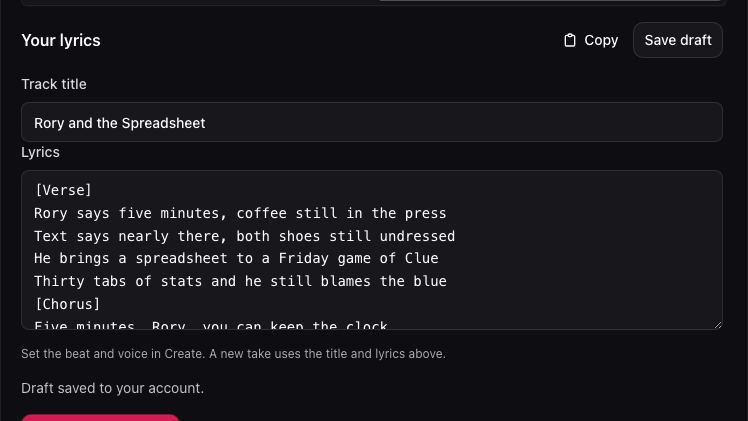
Read your hook aloud before you record. Shorten crowded lines and check that the title is right. The AI diss track generator uses the edited bars for your next take.
Write Your LyricsMake a rap you can play and share. Draft or paste your bars, pick a beat and rapper voice, then listen to the takes and download your favorite MP3.
Hear how an AI diss track generator can turn a familiar complaint into a hook. Listen for the moment the missing leftovers become the punchline.
Dave keeps eating his roommate’s labeled leftovers and leaves the dishes in the sink. The roommate wants to turn that running joke into a playful boom bap diss track.
The track opens with a complaint about missing noodles. The hook brings the joke back to the sink, with a steady boom bap beat underneath. Listen to the finished 57-second sample.
Writing for your own beat? Draft and export the bars with the Diss Track Lyrics Generator.
Give the AI diss track generator a nickname and one specific story. Choose the relationship and how sharp you want the roast to sound.
Use the AI diss track generator to draft the bars. Tighten the hook, give the track a title, and save it to your account.
Choose the beat and rapper voice in the AI diss track generator. Play the takes and download the MP3 you want to share.
Read your hook aloud before you record. Shorten crowded lines and check that the title is right. The AI diss track generator uses the edited bars for your next take.
Write Your Lyrics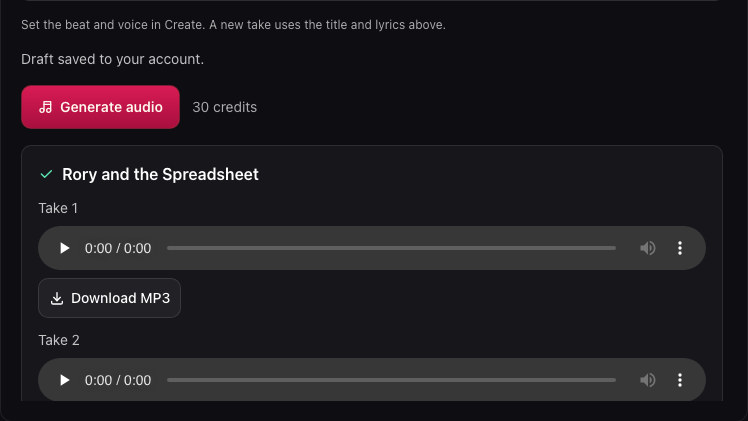
The AI diss track generator can return two takes from one audio request. Listen for the clearest nickname, the strongest hook, and the delivery that suits your joke. Download either take as an MP3 to keep or share.
Try the StudioFor a birthday, game night, or group chat, start with a story everyone knows. One familiar detail gives your rap a punchline.
Give the AI diss track generator a detail your audience will recognize, like a teammate’s pregame routine or a friend’s excuse for showing up late.
Try boom bap for a classic battle feel or trap for a sharper delivery. The AI diss track generator offers six beat styles, including lo-fi.
Listen to each AI diss track before sharing it. Try the other take if the first delivery rushes your punchline.
Save your draft in the AI diss track generator and reopen it from My tracks. The title, edited lyrics, beat, and voice follow your account.
It writes an English roast verse and hook from your nickname and story. After you review the lyrics, it can record them over a beat with a rapper voice. The audio stage gives you playable MP3 takes.
You can play the examples and prepare a brief without signing in. A new account starts with 80 credits, enough for two audio requests with room to write or revise lyrics. Writing lyrics uses 1 credit and each audio request uses 30.
Yes. Open My work and paste your bars into the editor. Add a title and choose a beat and voice. Then generate the audio without paying for a lyric draft.
Pick a nickname everyone recognizes and describe one incident. If a friend memorizes the rules and still blames the dice, give the AI diss track generator both halves of the joke.
To make a rap diss track for your mom, pick a joke you both enjoy, like her reminders to bring a jacket. Select Parent and Playful in the AI diss track generator, then read the bars aloud before recording.
Pronunciation can vary by take. Spell an unusual nickname the way it sounds, or use a shorter name the listener already knows. Listen to the first verse before you send the file and revise the spelling if the voice trips over it.
A new audio request uses your current title and bars with the new settings. Your earlier takes stay available during their retention period, so you can listen to both versions before choosing a favorite.
Open My work in the AI diss track generator and click Download MP3 under your favorite take. Attach the file in a message or play it at the party.
Save your draft, then sign in to the same account to find it under My tracks. The AI diss track generator keeps audio for seven days on free accounts.
A failed generation returns your credits and keeps your saved draft. If a result takes longer than expected, select Check status to look up the existing request before you start another recording.
Give the AI diss track generator a nickname and a shared habit or fictional rivalry. Read the lyrics aloud before recording, especially if you’ll play them in front of the person.
Reopen your lyrics in the AI diss track generator and save the revised hook. Each recording stays tied to the bars you submitted for that take.

Bring one story your friends know to the AI diss track generator. Write the hook, put it over a beat, and keep the take that makes you laugh.
Start a Track